 2 min read
Set a custom thumbnail
Upload your own thumbnail image instead of whatever YouTube grabs automatically — free on every plan, once a broadcast exists.
Go live first
A thumbnail attaches to a specific YouTube broadcast, so there needs to be a real one to attach it to — Upload image is available once you've gone live (or scheduled) at least once for that stream. Trying it beforehand shows "No broadcast to set a thumbnail for yet."
Upload your image
From the Broadcast details card, Upload image (or Change image, if one's already set) accepts a JPEG or PNG under 2MB — YouTube's own hard limit. It applies to your current broadcast right away.
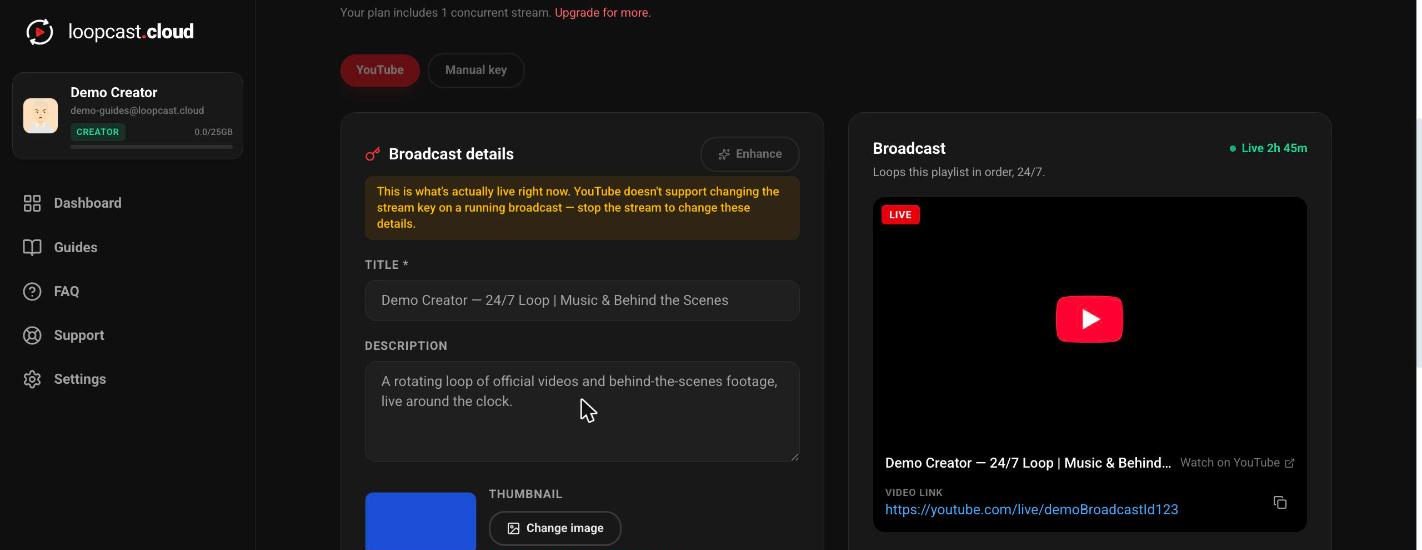
On desktop
If you get a "video cannot be found" error
This means the broadcast this stream last pointed at no longer exists on YouTube — usually because it was deleted directly there rather than stopped from Loopcast. Click Go Live to create a fresh broadcast, then upload the thumbnail again; it'll attach cleanly to the new one.
Worth knowing
- ·Uploading a new thumbnail always replaces the previous one — there's no gallery of past thumbnails to pick back from.
- ·Since Go Live always creates a fresh broadcast, a thumbnail needs to be re-uploaded each time you start a new broadcast cycle — it doesn't carry over automatically.
Check your stream stats & use Enhance