 Always live, from the cloud
24/7 YouTube live stream
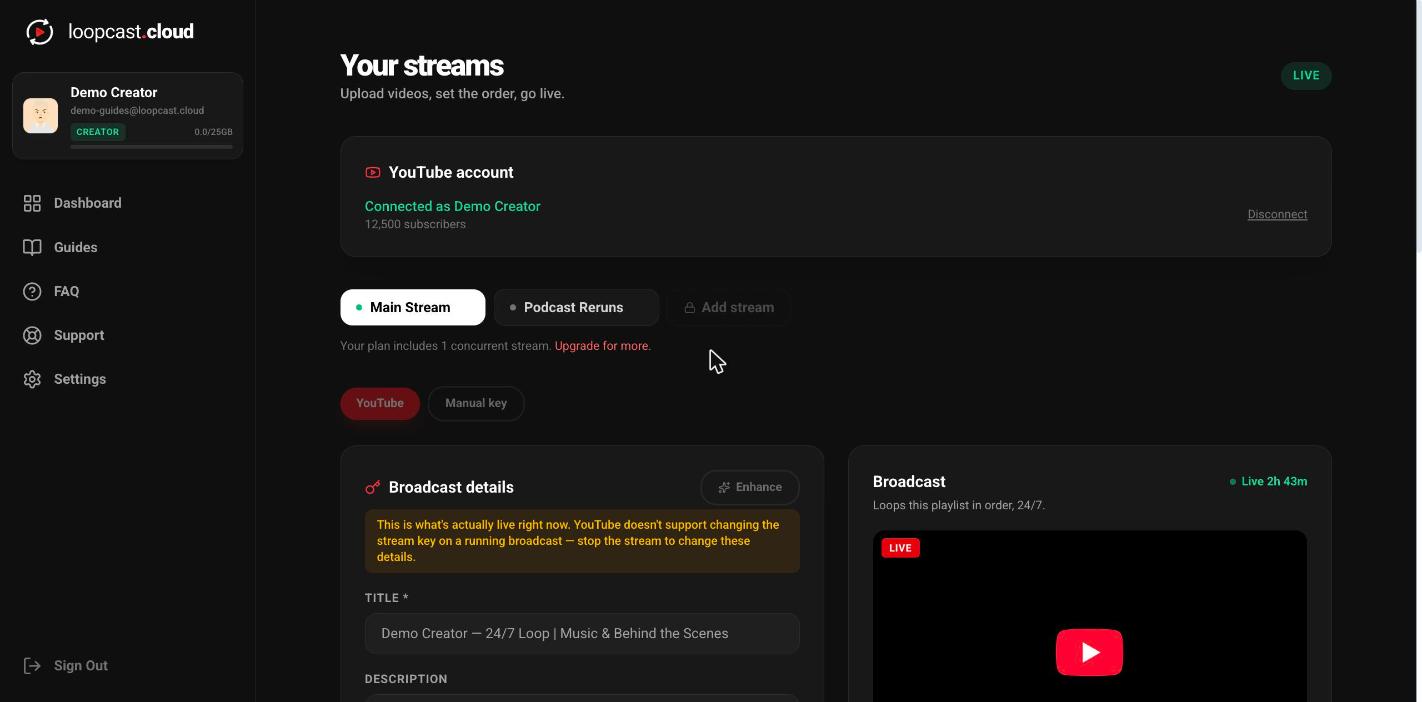
To run a 24/7 YouTube live stream, you need something that sends video to YouTube every hour of every day. Loopcast does that from the cloud: upload your videos, set the order, connect your channel and click Go Live. The stream keeps running when your computer is off, and you can change the playlist without ever stopping it.
No OBS. No dedicated PC.
Everything renders in our cloud. Close your laptop and the stream keeps going — no always-on computer, no encoder to configure. Update your playlist any time and it picks up automatically at the next loop, with no downtime — built to run 24/7/365, for years on end.
Connect once, live in seconds
Sign in with YouTube and Loopcast creates the broadcast for you — no stream key to copy, ever. Free to connect on any plan.
How it works in Loopcast
- 1
Upload your videos
Upload from your phone or computer, one file or a batch. Loopcast converts each one to a stream ready format in the background, so you do not need to re encode anything first.
- 2
Set the order
Add videos to the stream's playlist and drag them into the order you want. The total runtime updates as you go, so you know how long one full loop takes.
- 3
Connect YouTube
Sign in with the Google account that owns the channel and Loopcast creates the live broadcast for you, with no stream key to copy. You can paste a stream key instead if you prefer.
- 4
Add a title and go live
Fill in the title, description and privacy, add a custom thumbnail if you like, and click Go Live. The status flips to Live on its own once YouTube picks up the stream.
Why a home PC is the hard way to stay live 24/7
The usual setup is OBS on a computer that never turns off. It works until the PC sleeps, installs an update, loses power or drops its internet connection, and then the stream is down until someone notices. You also pay for the electricity and give up that machine.
Loopcast moves the streaming part to the cloud. Your videos live on Loopcast, and Loopcast sends them to YouTube around the clock. Nothing on your side has to stay on.
What keeps a 24/7 stream healthy on YouTube
YouTube only saves the first 12 hours of a live stream as a replay. On a stream that never ends, everything after that is lost, along with the watch time those hours could have counted toward the Partner Program.
Loopcast's auto restart (Creator and Pro, with a connected YouTube account) ends the broadcast and starts a fresh one every 6, 8 or 11 hours on the same stream. Your video never stops; viewers see about 10 seconds of switchover, and each part is saved as its own replay.
- ·Playlist edits apply live: add, remove, reorder or trim a clip and Loopcast picks it up at the end of the clip that is playing.
- ·Schedule a broadcast for later on Creator and Pro, so a launch can go live at a set time.
- ·Views, watch time and subscribers gained show up in your dashboard on Creator and Pro.
Why 24/7 grows a channel
A 24/7 stream means your channel is live whenever someone is looking, in any time zone, including the hours you are asleep. Every one of those hours is a chance to show up in YouTube's live results and recommendations.
Watch time keeps adding up around the clock, and with auto restart each part is saved as a public replay so those hours keep working for the channel after the broadcast ends.
A stream that is always on is also a standing invitation. Put your other socials in the description and new viewers who find you at 3am can follow you everywhere else too.
Pricing
Creator
$11/mo
or $111 a year
- 1 live-loop YouTube stream
- Connect up to 3 YouTube channels
- 25GB storage
- Unlimited video length
Pro
$33/mo
or $333 a year
- Up to 3 live-loop YouTube streams
- Connect a different YouTube channel to each stream
- 100GB storage
- Unlimited video length
Pro can add up to 5 extra stream slots at $7 a month each. Cancel any time. Full pricing and plan comparison
How the free trial works
In supported countries (the US, Canada, Puerto Rico, the UK and Ireland, Australia and New Zealand, most of Western Europe and the Nordics, the Gulf states, Japan, South Korea, Singapore, Hong Kong, Taiwan and Israel) every free account gets one 24 hour live trial with no card required. Starting it unlocks uploads and gives you 7 days to set up, and the 24 hours only start when you first go live. Trial videos can be up to 1 hour each, and a short Loopcast ad plays once per pass of your loop. Everywhere else, uploading and going live start with a plan.
Frequently asked questions
Can I keep a YouTube live stream running with my computer off?
Yes. Loopcast streams from the cloud, so once you click Go Live nothing on your side needs to stay on. Close the laptop and the stream keeps running.
Does YouTube allow 24/7 live streams?
Yes, YouTube supports live streams that run continuously, as long as the content follows YouTube's rules and you have the rights to it. Note that YouTube only archives the first 12 hours of a stream as a replay, which is why Loopcast offers auto restart.
Do I need OBS or a stream key?
No. Connect your YouTube channel once and Loopcast creates and manages the broadcast for you. If you would rather use a stream key, you can paste one, and that also lets you stream to Twitch, Facebook Live or any RTMP platform.
Can I change the videos while the stream is live?
Yes. Upload, add, remove or reorder videos at any time. Loopcast applies the change at the end of the clip that is currently playing, with no stop and no new Go Live.
How much does a 24/7 YouTube live stream cost on Loopcast?
Creator is $11 a month for one 24/7 stream with 25GB of storage. Pro is $33 a month for up to 3 streams at once with 100GB, and can add up to 5 extra stream slots at $7 a month each. Paying yearly is $111 or $333, about 2 months free. Cancel any time.
Is there a free trial?
Yes. In supported countries (the US, Canada, Puerto Rico, the UK and Ireland, Australia and New Zealand, most of Western Europe and the Nordics, the Gulf states, Japan, South Korea, Singapore, Hong Kong, Taiwan and Israel) every free account gets one 24 hour live trial with no card required. Starting it unlocks uploads and gives you 7 days to set up, and the 24 hours only start when you first go live. Trial videos can be up to 1 hour each, and a short Loopcast ad plays once per pass of your loop. Everywhere else, uploading and going live start with a plan. Upgrade any time to remove the ad and keep streaming.
Guides, tools and reading
Start your 24/7 YouTube live stream
Upload a few videos, connect your channel and go live from the cloud. Your computer can be off the whole time.
No card required for the trial. Plans from $11/mo. See pricing
More ways to use Loopcast
We use cookies for analytics and advertising to understand how people use Loopcast and measure our marketing. See our Privacy Policy for details.