 Your video, broadcast live
Pre-recorded live stream on YouTube
A pre-recorded live stream is a video you already made, sent to YouTube as a live broadcast instead of a regular upload. With Loopcast you upload the file, connect your channel and click Go Live (or schedule it for later). Loopcast streams it from the cloud and keeps looping your playlist for as long as you leave it live.
No OBS. No dedicated PC.
Everything renders in our cloud. Close your laptop and the stream keeps going — no always-on computer, no encoder to configure. Update your playlist any time and it picks up automatically at the next loop, with no downtime — built to run 24/7/365, for years on end.
Connect once, live in seconds
Sign in with YouTube and Loopcast creates the broadcast for you — no stream key to copy, ever. Free to connect on any plan.
How it works in Loopcast
- 1
Upload your videos
Upload from your phone or computer, one file or a batch. Loopcast converts each one to a stream ready format in the background, so you do not need to re encode anything first.
- 2
Trim if needed
Cut a slow intro or a dead ending right in Loopcast: open the preview, drag the trim handles, then save and Loopcast re processes the clip.
- 3
Connect YouTube
Sign in with the Google account that owns the channel and Loopcast creates the live broadcast for you, with no stream key to copy. You can paste a stream key instead if you prefer.
- 4
Go live now or schedule it
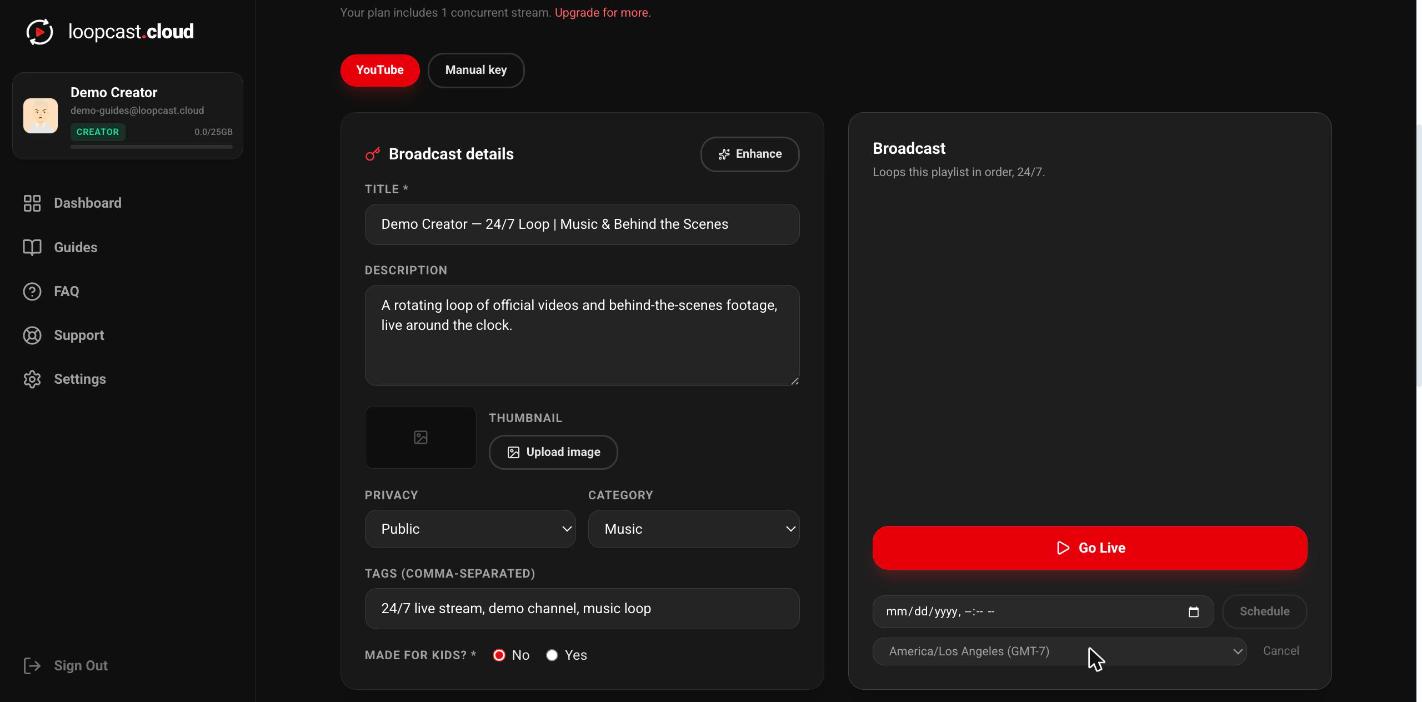
Click Go Live to start right away, or on Creator and Pro pick Schedule for later and Loopcast creates the YouTube broadcast when the time comes.
Why stream a pre-recorded video as live
A live broadcast shows up in places a normal upload does not: live results, the red Live badge on your channel, and live chat where viewers talk while it plays. For a replay of a show, a rehearsed set, a sermon or a class, that can bring the energy of a live moment to something you recorded on your own schedule.
YouTube Studio itself goes live from a webcam or an encoder. It has no button to stream a file you already have as live. That is the gap a cloud streaming tool fills.
One showing, a loop, or around the clock
Loopcast plays your playlist in a loop for as long as the stream is live. Put one video in the playlist to repeat a single recording, or line up several to run a full schedule of reruns. Stop the stream whenever you want the showing to end.
- ·Use the Enhance button to get title, description and tag suggestions from what you have typed.
- ·Set a custom thumbnail so the live broadcast looks finished in search and on your channel.
- ·Stream to YouTube by connecting the channel, or paste a stream key for Twitch, Facebook Live or another RTMP platform.
Be upfront with viewers
A good pre-recorded stream says what it is. A title or description line like "replay" or "recorded set" keeps chat friendly and avoids viewers expecting you to answer in real time. Only stream content you own or have the rights to.
Why 24/7 grows a channel
Going live with a recording lets your channel be live far more often than you could be in person, and each broadcast is another chance to be found in live results.
If you leave it running 24/7, watch time keeps adding up while you sleep. Auto restart on Creator and Pro saves each part as a replay, so those hours still count after the broadcast ends.
Every live viewer sees your description. Link your other socials there and a rerun keeps sending people to follow you elsewhere.
Pricing
Creator
$11/mo
or $111 a year
- 1 live-loop YouTube stream
- Connect up to 3 YouTube channels
- 25GB storage
- Unlimited video length
Pro
$33/mo
or $333 a year
- Up to 3 live-loop YouTube streams
- Connect a different YouTube channel to each stream
- 100GB storage
- Unlimited video length
Pro can add up to 5 extra stream slots at $7 a month each. Cancel any time. Full pricing and plan comparison
How the free trial works
In supported countries (the US, Canada, Puerto Rico, the UK and Ireland, Australia and New Zealand, most of Western Europe and the Nordics, the Gulf states, Japan, South Korea, Singapore, Hong Kong, Taiwan and Israel) every free account gets one 24 hour live trial with no card required. Starting it unlocks uploads and gives you 7 days to set up, and the 24 hours only start when you first go live. Trial videos can be up to 1 hour each, and a short Loopcast ad plays once per pass of your loop. Everywhere else, uploading and going live start with a plan.
Frequently asked questions
Can you stream a pre-recorded video on YouTube Live?
Yes. YouTube accepts any video sent to it through a live stream. Loopcast sends your uploaded video as a live broadcast from the cloud, so you do not need OBS or a computer running during the stream.
How is this different from a YouTube Premiere?
A Premiere plays a newly uploaded video once, at a set time, and then it becomes a normal video. A live stream from Loopcast keeps looping your playlist for as long as you leave it live, can run 24/7, and can be stopped or changed any time.
Can I schedule a pre-recorded live stream?
Yes, on Creator and Pro. Fill in the broadcast details and choose Schedule for later. Nothing is created on YouTube until it is time, and you can cancel or change it before then.
What video formats can I upload?
Most common formats work. Loopcast converts every upload to a stream ready format in the background. MP4 (H.264) processes fastest, but you do not need to convert anything yourself.
How much does it cost?
Creator is $11 a month for one 24/7 stream with 25GB of storage. Pro is $33 a month for up to 3 streams at once with 100GB, and can add up to 5 extra stream slots at $7 a month each. Paying yearly is $111 or $333, about 2 months free. Cancel any time.
Is there a free trial?
Yes. In supported countries (the US, Canada, Puerto Rico, the UK and Ireland, Australia and New Zealand, most of Western Europe and the Nordics, the Gulf states, Japan, South Korea, Singapore, Hong Kong, Taiwan and Israel) every free account gets one 24 hour live trial with no card required. Starting it unlocks uploads and gives you 7 days to set up, and the 24 hours only start when you first go live. Trial videos can be up to 1 hour each, and a short Loopcast ad plays once per pass of your loop. Everywhere else, uploading and going live start with a plan. Upgrade any time to remove the ad and keep streaming.
Guides, tools and reading
Stream your recording as live
Upload the video, connect YouTube and go live now or later. No OBS, no computer left running.
No card required for the trial. Plans from $11/mo. See pricing
More ways to use Loopcast
We use cookies for analytics and advertising to understand how people use Loopcast and measure our marketing. See our Privacy Policy for details.